

Workflows
What is a Workflow?
A workflow is a procedure the AI follows for one specific situation: look this up, check that, reply this way, and hand it to a human when it does not add up.
Where a policy says what your business has decided, a workflow says what the AI should do, step by step, with real tools and real branches. Reach for one when the answer depends on data the AI has to fetch first, when different situations need genuinely different replies, or when the case involves an action, not just a reply.
Workflows live under Workflows in the app. You can start from a template or from an empty canvas.
The WISMO example 📦
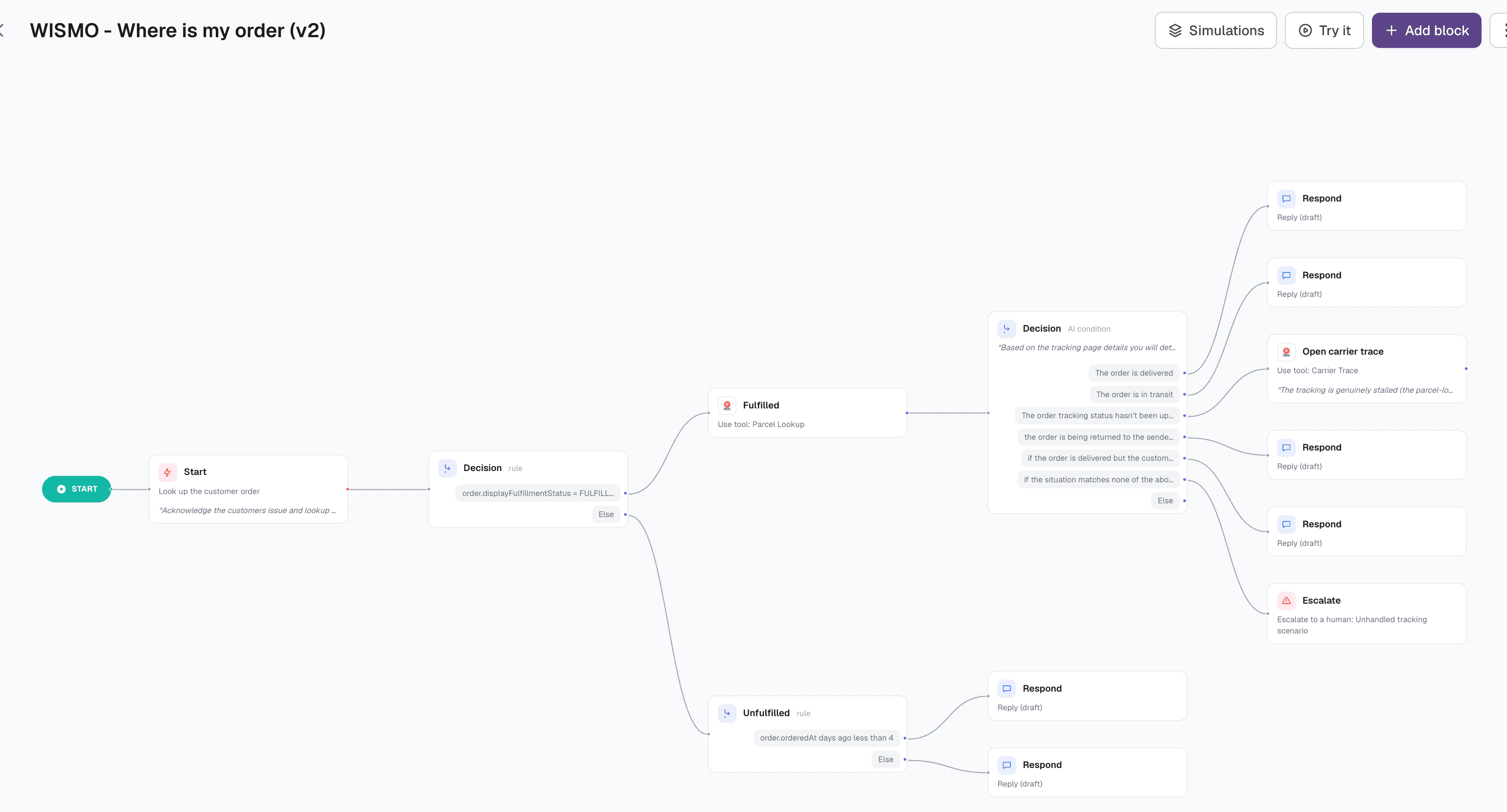
"Where is my order" is the classic case, and it makes a good tour, because almost nothing about it is a single answer. The customer asks one question, but the right reply depends on whether the order shipped, what the carrier says, and how long it has all been going on.
Read the canvas from left to right:
- Start. Acknowledge the customer and look up their order.
- Decision (rule): is the order fulfilled? Two hard branches, decided on the order data, not on judgement.
- Fulfilled → look the parcel up with the carrier, then a second decision, this one an AI condition over the tracking page: delivered, in transit, no tracking update for five days, on its way back to the sender, delivered but the customer cannot find it, or none of the above.
- Each of those ends somewhere concrete: a reply with the tracking link, a reply asking the customer to check with neighbours, an Open carrier trace that starts a parcel investigation, or an Escalate for the cases nobody anticipated.
- Unfulfilled → one more rule: ordered less than four days ago? Then it is a normal warehouse delay and the reply says so. Older than that, and something is genuinely wrong, so the customer is told it is being chased.
That is the shape of a good workflow: a couple of cheap lookups, decisions that get narrower as they go, and every branch ending in a real outcome rather than a shrug.
Nodes and blocks
The canvas is made of nodes, connected left to right. Each node does one thing, and the connectors decide what happens next. The building blocks:
- Find order 🔍 Loads the customer's order from your shop integration.
- Use tool 🔧 Calls one of your agent tools: parcel lookup, carrier trace, address update, cancellation, anything you have connected.
- Decision 🔀 Branches. Either a rule or an AI condition, see below.
- Respond 💬 Replies to the customer. You write an example response and the AI fills in the specifics.
- Ask ❔ Asks the customer something and parks the workflow until they answer, then picks up where it left off.
- Policy respond 📘 Replies using one of your stored policies, so the wording stays in one place.
- Internal note 📝 Leaves a note for your team on the ticket. The customer never sees it.
- Side conversation ✉️ Emails someone outside the ticket, for example a warehouse or a supplier.
- Escalate 🚨 Hands the conversation to a human, with a reason.
- Tag 🏷️ Tags the conversation.
- End 🏁 Finishes the workflow and hands control back to the AI's normal handling.
Rule or AI condition?
Every decision node is one of two kinds, and picking the right one is most of the craft.
- A rule compares a field: order status equals fulfilled, ordered less than four days ago, order total above a threshold. Deterministic, no judgement, always the same answer for the same data. Use it whenever the data can answer the question.
- An AI condition is a sentence: "the order is in transit", "the customer agreed to the replacement". The AI reads the conversation and the tool results and decides. Use it for anything a field cannot express.
In the WISMO example both appear, and in the natural order: rules to split the big obvious cases, an AI condition for the messy tracking reality underneath.
Note: give an AI decision a catch-all branch. The WISMO flow ends its list with "if the situation matches none of the above" pointing at an escalation, which is why unusual cases reach a human instead of getting the closest-looking canned reply.
Replies and approvals 🔒
Each Respond node carries its own response method: draft (a human sends it), semi-automated (sent, conversation stays open) or fully automated (sent and closed). New reply blocks start as drafts, which is the right way to launch a workflow: watch what it produces, then loosen the branches you trust.
Tool calls have their own gate. Any Use tool node can require approval, and then the AI proposes the call and waits for a human to accept it before anything happens. In the WISMO flow the carrier trace is gated that way: it opens a case with a third party, so a person confirms it. Read-only lookups like the parcel status run freely.
Your team-wide automation settings still cap everything. A fully automated branch under a drafts-only setup produces a draft.
How the AI picks a workflow
Every workflow has a When to use description, and that text is what the AI reads to choose between your workflows for a given message. Treat it as routing instructions, not a summary:
- Open with the situation: "Customer is asking about the status of an order or delivery."
- Name the trigger phrases customers actually use, in their language.
- Say what is required: "needs an order number or the customer's email".
- Disambiguate from neighbours: "Do NOT use for returns, see the Returns workflow."
Once a workflow is running it stays with the conversation across replies, including while an Ask node waits for the customer. If the customer changes the subject, the AI leaves the workflow and goes back to normal handling.
Testing before you publish 🧪
Two things sit in the editor's top bar, and both run against the draft on your canvas, not the published version.
- Try it opens a chat where you play the customer. The route the AI takes lights up on the canvas as it goes, so you can see which branch it chose and where it stopped.
- Simulations are saved test conversations. Each one is a scripted customer, a route it should walk and criteria it should meet. The list also shows which outcomes have no test yet and can draft one for you.
Simulations do not block publishing. They are there so a change to one branch does not quietly break another.
Publishing and versions
Editing changes your draft. Publishing snapshots it as a new version, and that version is what runs for customers from then on. Older versions are kept, so you can look back at what changed, and roll back if a new version misbehaves.
A workflow can also be switched inactive, which takes it out of use without deleting anything. That is the fastest fix if a live workflow is doing the wrong thing.
Good to know
- Keep straight lines straight. Nodes are for branch points and actions, not for narrating steps that always follow each other.
- Every branch should end in a reply, an escalation or an End. A branch that just stops leaves the customer waiting.
- Write example responses in your own voice, with the specifics filled in. Vague templates produce vague replies.
- Tools first, decisions after. A decision can only be as good as the data loaded before it.
- One workflow per scenario. Two workflows that both claim "order questions" will compete, and the AI's choice comes down to whichever When to use text is clearer.
- Templates exist for the common scenarios (WISMO, cancellations, returns, address changes). Installing one gives you a working flow you can edit, which is usually faster than starting from an empty canvas.
Did this answer your question?