

Macros
What is a Macro?
A macro is a saved piece of reply text your agents can drop into the message they are writing. The returns address, the standard wording for a delayed parcel, the paragraph nobody can ever remember the exact phrasing of.
Think of a macro as a building block rather than a finished reply. It goes in at the cursor, in the middle of a sentence if you like, and you keep editing afterwards. Nothing is sent until you send it.
Note: Macros are written for your agents, but turn on one setting and AI drafts can start from your macros too. See Letting AI drafts use them below.
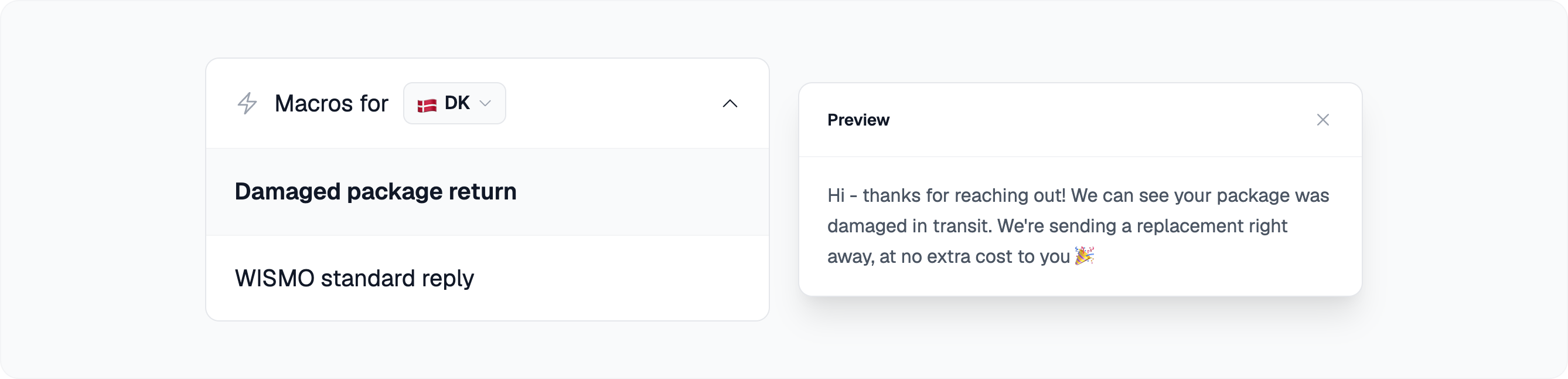
Dropping one into a reply
There are three ways to open the macro picker while you are writing, and they all do the same thing. Use whichever fits your hands.
- Type = ⌨️ At the start of the message or after a space, the equals sign opens the picker instead of typing a character, the same way : opens the emoji picker.
- The lightning button ⚡ In the toolbar under the message box.
- Ctrl+Shift+M 🎹 Cmd+Shift+M on a Mac.
Search by name, move with the arrow keys, and press Enter to insert. Hovering a macro shows its full text next to the list, so you can check you have the right one before it lands in your reply.
Note: The picker only appears once your team has at least one macro. If an agent says they cannot find it, that is usually why.
Placeholders and variables
A macro does not have to be static text. Two kinds of placeholder are filled in the moment it is inserted.
- {{customerName}} and {{customerFirstName}} 👤 Taken from the customer on the ticket you are replying to.
- Your own variables 🔑 Reusable values you define under Settings → Variables: a current discount code, a returns portal link, a support phone number. Give each one a key and a value, and every macro using it updates at once when the value changes.
Variables can hold a different value per market, with a default for the markets you have not given a specific value. One macro with a {{returnsLink}} in it then sends the Danish link on Danish tickets and the Swedish link on Swedish ones.
Note: A variable that a macro is using cannot be deleted. Take it out of the macros first, so no reply ever goes out with a broken placeholder in it.
Markets and languages
Agents should only be offered the macros that make sense for the ticket in front of them, so two things filter the list.
Markets. Leave the market field empty and the macro is global, available everywhere. Pick one or more markets and it is only offered on tickets belonging to them. Use it for anything with a market-specific address, opening hours or legal wording.
Language. Macro content is translatable. The helpdesk offers the version that matches the language of the conversation, not the language of the market, so an English customer writing into your Danish market gets the English wording. If a translation is missing, the macro is translated on the spot when the agent inserts it, and kept for next time. You can also write or correct translations yourself from the Translations link in the macro editor.
Creating and managing them
Macros live under Settings → Macros. A macro needs a name and its content, written in a normal rich-text editor with bold, lists, links and quotes. The badges above the editor insert a placeholder at the click of a button.
The name is what agents search on, so name for the situation rather than the wording: Delayed parcel, Refund confirmed, Return outside 30 days. Nobody searches for "Hi there".
Manage Macros is its own permission. You can let a senior agent look after the team's wording without giving them access to the rest of your settings. See Capabilities.
Note: Coming from Zendesk? Your existing macros can be imported rather than retyped. Ask us and we will run it for you.
Letting AI drafts use them
Turn on AI drafts can use saved macros under Settings → Account → AI Involvement, and the AI searches your macros while it writes a draft. When one fits the ticket, it becomes the base of the reply, in the customer's language and with the market's variables filled in. The macros it used are linked on the draft, so the agent can see where the wording came from.
- Drafts only ✍️ This covers the drafts the AI writes on customer follow-up emails, which a person reviews before anything is sent. Chat replies and answers the AI sends on its own do not use macros.
- Checked, not pasted 🔍 The AI keeps the macro's wording and links, but checks its conditions against the ticket and fills its placeholders from what it knows about this customer. A macro saying a refund is done does not make it done.
- Markets still apply 🌍 A macro limited to certain markets is only used on tickets from those markets.
Note: Switching the setting on prepares your existing macros for search, which takes a few minutes. Macros you save afterwards are picked up on their own.
When to pick something else
- Articles and policies 📚 If the goal is that the AI answers this correctly, write it as an article or a policy. Those shape every AI reply, chat included. A macro only reaches AI drafts, and only with the setting above turned on.
- Communication style 🎙 If you want every reply to sound a certain way, that is a style setting, not something to paste into each message by hand.
- Workflows 🔀 If the situation has steps, lookups and decisions rather than just wording, it belongs in a workflow.
Good habits
Keep them short. A macro that covers a whole reply gets edited heavily every time it is used, and half of it is wasted. Small blocks you can combine beat one long template.
Put anything that changes in a variable. Discount codes, links, phone numbers and prices in the macro text itself go stale, and the wrong version then goes out for months before anyone notices.
Prune the list. Every macro nobody uses makes the ones people need harder to find. Two or three a team actually reaches for beat forty that nobody scrolls past.
Watch what gets rewritten. Every macro that makes it into a sent reply is recorded, including how much of its text survived your agents' edits. A macro that is always rewritten is telling you its wording is wrong. Ask us if you want the numbers for your team.
Did this answer your question?